Building a Raycaster from Scratch

I wanted to understand how games like Wolfenstein 3D rendered 3D worlds from a simple 2D map. I read a bunch of explanations, but most of them seemed to assume I already understood raycasting. They'd say "just cast a ray for each column and use the distance as the height", and then draw a diagram made of backslashes:
      \\\\\\
       \\\\\
        \\\\
         \\\
          P
I stared at that for a long time and got nothing out of it, so I built the whole thing from an empty file instead. It's a little engine I've been calling raycore, and this post is the version I wish I'd read, with real pictures for the parts that confused me.
By the end you'll have a program that walks around a maze and draws it in 3D. It's the slow, obvious version, which is also what I actually have running; near the end I go through the faster algorithm I haven't got to yet. The code is C with SDL2, though none of the ideas depend on either.
There's no 3D in a raycaster
It took me longer than it should have to realise this, so I'll say it first: there's no 3D anything in a raycaster.
Your world is a flat grid, like a chessboard. Some squares are walls, the rest are floor. That's the whole world. No cubes, no vertices, no meshes, no depth buffer.
The 3D look comes from one trick: things that are further away get drawn shorter.
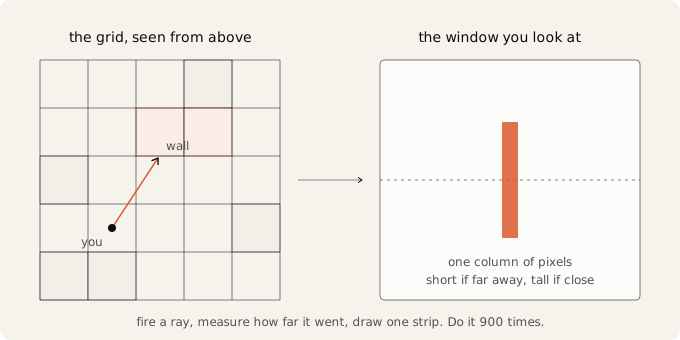
So the program ends up as two halves that barely touch. One half is a flat grid with a dot walking around on it. The other half is a window full of vertical lines whose heights come from that grid. Most of my early confusion came from mushing those two together in my head.
Here's the smallest complete piece of the program:
Decide what "one unit" means before you write anything
This part is boring and it's probably the most important decision in the project. I got it wrong the first time and it cost me a couple of hours.
I started out with a cell being 50 units wide. So the player sat at position 175.0, walls were 50 apart, and the view distance was 250. Every number in the program was in the hundreds and none of them meant anything to me.
Make one cell equal 1.0 instead.
Now a player at (3.5, 2.5) is standing in the middle of cell (3, 2). To find which cell a position is in, you chop off the decimals. Wall height is 1.0. A view distance of 20 means twenty cells, which is a number I can actually picture.
The other half of this decision: the grid and the screen are different coordinate spaces, and one function should convert between them. World positions are small numbers like 3.5, screen positions are big numbers like 640, and mixing them up causes a lot of confusion later.
#define MINIMAP_X       12     // where the minimap sits, in pixels
#define MINIMAP_Y       12
#define MINIMAP_PIXELS  200    // how big it is, in pixels
#define MAP_MAX_DIM     ((MAP_WIDTH > MAP_HEIGHT) ? MAP_WIDTH : MAP_HEIGHT)
#define MINIMAP_SCALE   (MINIMAP_PIXELS / (double)MAP_MAX_DIM)

void WorldToMinimap(double world_x, double world_y, int *out_x, int *out_y) {
  *out_x = MINIMAP_X + (int)(world_x * MINIMAP_SCALE);
  *out_y = MINIMAP_Y + (int)(world_y * MINIMAP_SCALE);
}
MINIMAP_SCALE is derived from the other numbers rather than typed in. You pick how big the minimap should be and the pixels-per-cell figure falls out of that. Change the map to 32 by 32 and it still fits.
So all the geometry happens in world units, and the conversion to pixels happens once, right before drawing. My first version didn't have a function like this, and I ended up commenting out my draw-the-player code once the 3D view appeared, because it was writing world coordinates straight into screen space. That only worked while the two happened to be the same thing.
Build the debug view first
If you take one thing from this post, take this section.
I nearly threw the top-down view away once the 3D view started working, which would have been a mistake. You're about to spend hours debugging rays that go the wrong way, stop too early, or come back with distances that make no sense, and working that out by squinting at a screen full of coloured rectangles is miserable.
So draw the map from above, in the corner of the window, and keep it there. Draw the rays into it too. When something looks wrong in the 3D view you can look at the corner and usually see why straight away.
Writing the map down
You could store the map as a grid of numbers:
int map[5][5] = {
  {0, 0, 0, 1, 0},
  {0, 0, 2, 2, 0},
  ...
};
That's fine at 5 by 5 and useless at 24 by 24, because you can't look at 576 commas and see a room. Strings are much better:
#define MAP_WIDTH  24
#define MAP_HEIGHT 24

static const char *MAP[MAP_HEIGHT] = {
    "########################",
    "#......#...............#",
    "#......................#",
    "#......#...............#",
    "#......#....#####......#",
    "#......#....#...#......#",
    "########....#...#......#",
    "#...........##.##......#",
    "#......................#",
    "#####.############.#####",
    "#......................#",
    "#..#..#..#..#..#..#....#",
    "#......................#",
    "#..........#...........#",
    "#.####.....#..##..##...#",
    "#....#........##..##...#",
    "#.####.....#...........#",
    "#..........#..##..##...#",
    "#.#######..#..##..##...#",
    "#.......#..#...........#",
    "#.#######..##########..#",
    "#......................#",
    "#......................#",
    "########################",
};
You can see the level, and editing it takes seconds.
One catch: nothing stops you typing a row with 23 characters, and then the program reads past the end of that string into whatever happens to be sitting next to it in memory. So check at startup and let the check catch your typos:
for (int y = 0; y < MAP_HEIGHT; y++) {
  SDL_assert(strlen(MAP[y]) == MAP_WIDTH);
}
Make the border solid too. It saves you from a whole category of problem later.
Put a long straight corridor somewhere in the map too. If your test level is all open space you never see anything interesting happen with distance, and the optimisation I talk about at the end will look pointless.
One function reads the map
int MapAt(int cell_x, int cell_y) {
  if (cell_x < 0 || cell_x >= MAP_WIDTH || cell_y < 0 || cell_y >= MAP_HEIGHT) {
    return 1;   // outside the map counts as a wall
  }
  if (MAP[cell_y][cell_x] == '.') {
    return 0;
  }
  return 1;
}
Note MAP[cell_y][cell_x], with y first, because the first index picks the row. This looks backwards every time I read it and I've got it wrong more than once.
Every map lookup goes through this function, which means the bounds check lives in one place. In my first attempt the ray loop indexed the map directly and only checked the upper bounds, so a ray leaving through the left wall quietly wrapped around and came back in on the other side of the map. That one took me a while to track down.
Returning 1 for anything outside the map is deliberate. It means a ray that escapes the world stops at the boundary instead of flying off forever. The border is solid anyway, so this only really fires when something else is already broken, and I'd rather it fail quietly than hang.
I ended up reusing this function for the minimap and for collision as well, so three callers share the one bounds check.
Drawing it
void DrawMinimap(SDL_Surface *surface) {
  for (int cell_y = 0; cell_y < MAP_HEIGHT; cell_y++) {
    for (int cell_x = 0; cell_x < MAP_WIDTH; cell_x++) {
      Uint32 color = MapAt(cell_x, cell_y) ? 0xffdddddd : 0xff303038;

      int left   = MINIMAP_X + (int)(cell_x       * MINIMAP_SCALE);
      int right  = MINIMAP_X + (int)((cell_x + 1) * MINIMAP_SCALE);
      int top    = MINIMAP_Y + (int)(cell_y       * MINIMAP_SCALE);
      int bottom = MINIMAP_Y + (int)((cell_y + 1) * MINIMAP_SCALE);

      DrawFilledRect(surface, left, top, right - left, bottom - top, color);
    }
  }
}
First real bug: thin gaps in the minimap
My minimap came out with one pixel gaps in it, in a pattern that looked almost random.
200 pixels divided by 24 cells is 8.33 pixels per cell. My first version did the obvious thing, which was to find where the cell starts and then draw 8 pixels of it:
int left  = MINIMAP_X + (int)(cell_x * MINIMAP_SCALE);
int width = (int)MINIMAP_SCALE;   // always 8
Cell 2 starts at 16.67, chopped to 16, so it covers pixels 16 to 23. Cell 3 starts at 25.0, so it covers 25 to 32. Nobody ever draws pixel 24.
The fix is already in the code above: work out both edges and let the width be the difference. Cell 2's right edge and cell 3's left edge then come from the same expression, so they land on the same pixel by construction rather than by luck. Cells end up 8 or 9 pixels wide, which looks slightly uneven but is correct. Forcing them all to 8 is what leaves the holes.
The same mistake shows up again later, when wall columns need a top and a bottom.
The player
A position and a direction is all a player needs to be.
typedef struct {
  double x, y;      // world units, so 1.0 is one cell
  double angle;     // radians
} Player;

static Player player = { 3.5, 2.5, 0.0 };
The .5 is deliberate. Starting exactly on a cell boundary makes debugging confusing later, when you're trying to work out which cell something thinks it's in.
Store the angle in radians. cos and sin want radians, and if you store degrees you end up writing * DEG2RAD at every call site. Miss one and your player spins 57 times too fast, which was a fun ten minutes. Keep the readable numbers as constants and convert them once:
#define DEG2RAD     (M_PI / 180.0)
#define MOVE_SPEED  3.0                  // cells per second
#define TURN_SPEED  (120.0 * DEG2RAD)    // radians per second
Per second, not per frame. I'll come back to why that matters.
The direction thing that confused me
cos(angle) and sin(angle) turn an angle into "how much sideways" and "how much up or down", which I expected.
What I didn't expect is that in SDL, y counts downwards, so row 0 is the top of the window. So sin behaves upside down compared to school maths, and increasing your angle turns you clockwise on screen rather than anticlockwise. At angle 0 you face right. At 90 degrees you face down the screen, not up it.
You can flip this by negating y in the drawing layer if you'd rather. I didn't bother. It's one fact to remember and it's at least consistent everywhere.
Movement that doesn't depend on frame rate
I first moved the player inside a key press event:
case SDL_KEYDOWN:
  if (code == SDLK_UP) {
    player.x += cos(player.angle) * 0.1;
  }
Two problems with that. Your speed ends up decided by your operating system's key repeat rate, which is why it feels laggy and then suddenly fast. And it depends on how often frames happen, so the same program runs at a different speed on a different machine.
Instead, ask whether the key is held down right now, every frame, and multiply your speed by how much time actually passed:
void UpdatePlayer(double dt) {
  const Uint8 *keys = SDL_GetKeyboardState(NULL);
  double move_amount = MOVE_SPEED * dt;
  double turn_amount = TURN_SPEED * dt;

  if (keys[SDL_SCANCODE_A]) {
    player.angle -= turn_amount;
  }

  if (keys[SDL_SCANCODE_D]) {
    player.angle += turn_amount;
  }

  double forward_x = cos(player.angle);
  double forward_y = sin(player.angle);

  if (keys[SDL_SCANCODE_W]) TryMove( forward_x * move_amount,  forward_y * move_amount);
  if (keys[SDL_SCANCODE_S]) TryMove(-forward_x * move_amount, -forward_y * move_amount);
}
Events are still useful, just for different things. Use them for one-off stuff like closing the window, and use the held-down check for anything continuous.
That's SDL_SCANCODE_W, not SDLK_w. Scancodes are physical key positions. WASD was picked for its shape on the keyboard rather than for the letters, and on a French layout the letter W is somewhere else entirely.
Getting dt has one surprise in it. The obvious call is SDL_GetTicks, which gives milliseconds, but my loop was running about 1400 times a second. That's 0.7 milliseconds per frame, which rounds to zero, so the player would sit still and then jump. The high resolution counter fixes it:
Uint64 previous = SDL_GetPerformanceCounter();

// then each frame:
Uint64 now = SDL_GetPerformanceCounter();
double dt  = (now - previous) / (double)SDL_GetPerformanceFrequency();
previous   = now;

if (dt > 0.05) dt = 0.05;
That last line matters more than it looks. If you drag the window, or hit a breakpoint, or the machine stalls for a second, the next frame gets a huge dt and the player moves several cells in one step. Once you add wall collision, a step that big goes straight through walls, which is roughly how I spent an hour debugging collision code that turned out to be fine.
Casting one ray
Now we finally have enough pieces to cast a ray.
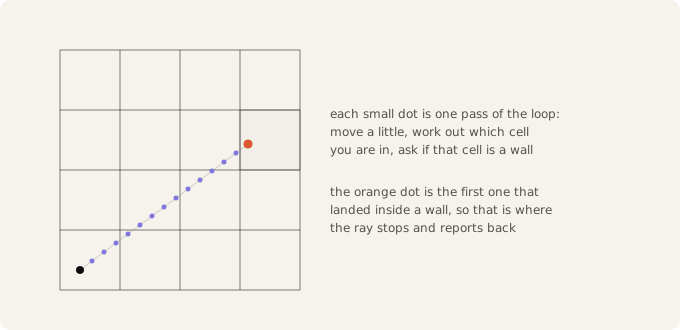
A ray is a point that starts at the player and crawls forward in a straight line until it bumps into a wall. Then you ask how far it got.
That's genuinely all it is. The word "ray" had me expecting something cleverer, some closed-form intersection maths. It's a loop that nudges a point forward and checks the map.
A ray needs to tell you several things at once, so it returns a struct:
typedef struct {
  bool   hit;          // did we find anything at all?
  double distance;     // how far, in cells
  int    wall_type;    // whatever MapAt gave back
  double hit_x, hit_y; // where exactly it stopped, in world units
} RayHit;
I first had this return -1 for "found nothing", which means every caller has to remember a made-up rule. A named bool is easier to read.
hit_x and hit_y are only there so I can draw the ray on the minimap and see where it thinks the wall is. Nothing in the rendering uses them, but they made this stage much easier to debug.
Now the ray itself:
#define RAY_STEP     0.02   // how far to crawl each pass, in cells
#define MAX_DISTANCE 20.0   // give up after twenty cells

RayHit CastRay(double origin_x, double origin_y, double angle) {
  RayHit result = {0};

  double step_x = cos(angle) * RAY_STEP;
  double step_y = sin(angle) * RAY_STEP;

  double ray_x = origin_x;
  double ray_y = origin_y;
  double travelled = 0.0;

  while (travelled < MAX_DISTANCE) {
    ray_x += step_x;
    ray_y += step_y;
    travelled += RAY_STEP;

    int cell_x = (int)floor(ray_x);
    int cell_y = (int)floor(ray_y);

    int wall_type = MapAt(cell_x, cell_y);
    if (wall_type != 0) {
      result.hit       = true;
      result.distance  = travelled;
      result.wall_type = wall_type;
      result.hit_x     = ray_x;
      result.hit_y     = ray_y;
      return result;
    }
  }

  return result;   // hit stays false
}
Four small decisions in there worth pointing out.
It takes an origin and an angle, not a player. A ray doesn't care that a player exists. Later you might want one from an enemy's eyes, or to check whether two points can see each other.
Distance is accumulated, not computed. My first version called sqrt(pow(ray_x - player.x, 2) + pow(ray_y - player.y, 2)) on every single pass of the loop. You don't need any of that. You already know how far each step goes, so keep a running total.
It moves before it checks. If you check the cell you're standing in, and the player is somehow inside a wall, you get a distance of zero and everything downstream divides by it.
It uses floor, not a cast. (int)(-0.5) gives you 0, because casting truncates towards zero, while floor(-0.5) gives you -1. With a cast, a position just outside the left or top edge reads as cell 0 instead of cell -1, so it looks like it's inside the map when it isn't. That was the other half of my left-edge trouble.
There's also no bounds checking anywhere in this loop, and it doesn't need any, because MapAt already treats anything outside the map as a wall, so the loop always terminates.
Walls you can't walk through
Small addition, but the obvious version of it feels bad to use.
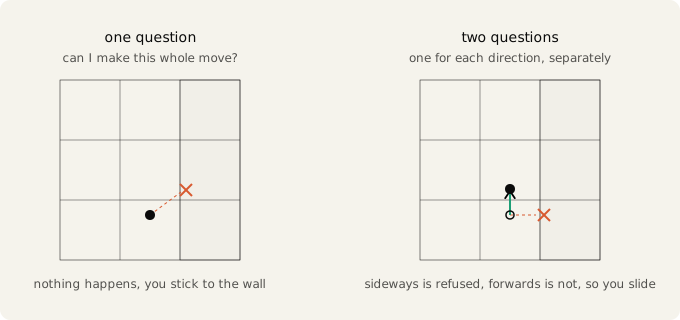
The obvious version: work out where you'd end up, ask if it's a wall, and if it is, don't move.
double new_x = player.x + delta_x;
double new_y = player.y + delta_y;
if (MapAt((int)floor(new_x), (int)floor(new_y)) == 0) {
  player.x = new_x;
  player.y = new_y;
}
Write this and try it. Walk diagonally into a wall and you stop dead, stuck, even though there's clearly open floor to slide along. It just feels broken.
The fix is to ask two questions instead of one, one per axis.
#define PLAYER_RADIUS 0.2

void TryMove(double delta_x, double delta_y) {
  double new_x   = player.x + delta_x;
  double check_x = new_x + copysign(PLAYER_RADIUS, delta_x);
  if (MapAt((int)floor(check_x), (int)floor(player.y)) == 0) {
    player.x = new_x;
  }

  double new_y   = player.y + delta_y;
  double check_y = new_y + copysign(PLAYER_RADIUS, delta_y);
  if (MapAt((int)floor(player.x), (int)floor(check_y)) == 0) {
    player.y = new_y;
  }
}
Now sliding along walls works, and it comes out of the same code rather than needing anything extra.
The copysign(PLAYER_RADIUS, delta_x) part gives the player some size. Without it you're a dimensionless point, and you can walk until your eyeball is exactly touching the wall, at which point the distance goes to zero and the wall height goes to infinity. Checking 0.2 ahead of yourself, in whichever direction you're actually moving, avoids that. copysign is just "0.2, with the same sign as this other number", so you're testing your leading edge rather than your middle.
Notice the second check uses the already-updated player.x. That's deliberate. By the time you're deciding about the forward move, the sideways move has either happened or it hasn't, and you want to test from where you actually are now.
This still isn't perfect, though. It only checks one point, offset in the direction you're moving. Your body has width perpendicular to that as well, and those corners go unchecked, so you can clip very slightly into a corner. Checking both corners fixes it properly. At a radius of 0.2 I couldn't really see it, so I left it.
Turning a distance into a height
I'd been treating this as a magic number, and it turns out to be one triangle.
Picture your eye at a point, with a flat screen floating a fixed distance in front of it. To work out where the top of a wall lands on that screen, draw a line from your eye to the top of the wall and see where it crosses the screen. Same for the bottom. The gap between those two crossings is the height you draw.
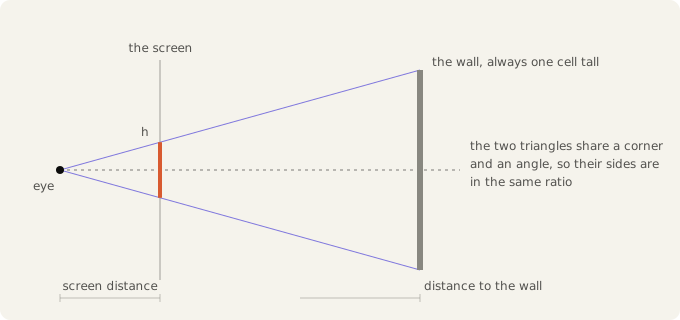
Those two triangles are the same shape, so their sides are in the same ratio:
      h on screen            real wall height
   -------------------  =  --------------------
     screen distance         distance to wall
Rearranged:
h = real wall height * screen distance / distance to wall
Now look at the top of that fraction. The wall height never changes, because every wall in the map is exactly one cell tall. The screen never moves either. So the whole top of the fraction is constant, and the only thing that varies is what you divide by.
Which is why every raycaster has a line that looks like a magic spell:
double wall_height = SOME_CONSTANT / distance;That constant is wall height times screen distance, and since wall height is 1.0, it's just the screen distance.
Working the constant out instead of guessing
The screen distance isn't yours to pick either. It has to be exactly far enough away that your field of view covers the width of your window:
screen distance = (WIDTH / 2) / tan(FOV / 2)
                = 450 / tan(33 degrees)
                = 450 / 0.6494
                = about 693 pixels
static double g_plane_distance;

// once, before the main loop starts:
g_plane_distance = (WIDTH / 2.0) / tan(FOV / 2.0);
So a wall one cell away comes out 693 pixels tall, which is taller than the window and gets clipped. Ten cells away it's 69 pixels. Twenty cells away it's 35.
Before I worked this out I had HEIGHT * 50 in there, which is 30000, divided by distances measured in fifty-unit chunks. Getting the number from the geometry instead took about ten minutes, and it means I can change the field of view without everything quietly breaking.
Two more notes on this formula, because both caught me out.
Don't put tan inside a macro. I did that at first, and since a macro is just text substitution I ended up calling tan once per column, every frame, to recompute a number that never changes. Work it out once into a variable.
And height falls off as one over distance, not one over distance squared. Apparent size is one over distance. Apparent brightness is one over distance squared, because light spreads out over an area. If you add distance shading later, don't reuse the same divisor for both.
One ray per column
One ray gives one column, and a 900 pixel wide window needs 900 columns. So you fire 900 rays spread across your field of view, and each one paints the next column to the right.
#define FOV_DEGREES 66
#define FOV         (FOV_DEGREES * DEG2RAD)
#define NUM_RAYS    WIDTH        // exactly one ray per pixel column

static RayHit rays[NUM_RAYS];

void CastAllRays(void) {
  for (int column = 0; column < NUM_RAYS; column++) {
    double ray_angle = player.angle
                     - FOV / 2.0
                     + FOV * column / (double)(NUM_RAYS - 1);

    rays[column] = CastRay(player.x, player.y, ray_angle);
  }
}
66 degrees is the classic value. Wide enough to move around without feeling like you're looking down a tube, narrow enough that things don't look stretched.
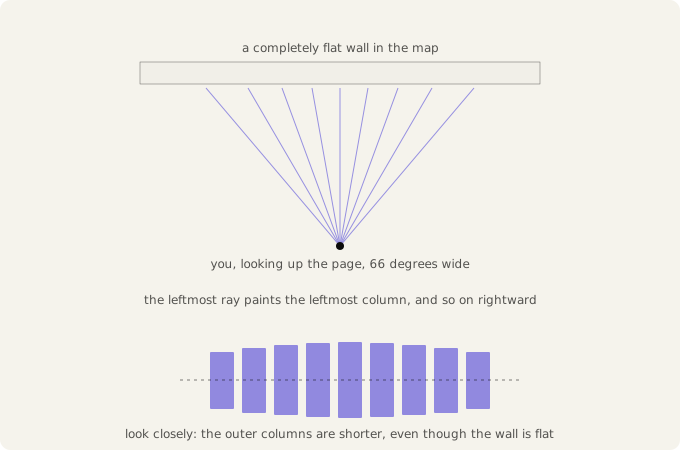
Three things to note here.
One ray per pixel column, exactly. My first version looped over angles in steps of 0.1 degrees and then worked out a screen position from the angle afterwards. Those two numbers didn't line up, so the columns landed about 1.1 pixels apart while each was 1 pixel wide, and the walls had thin vertical seams running down them. Making the loop variable be the column removes the problem entirely, since the array index and the screen x are then the same number.
Divide by NUM_RAYS - 1, not NUM_RAYS. With the minus one, column 0 lands exactly on the left edge of your view and the last column lands exactly on the right edge. Without it the last ray falls one step short, so your view is slightly narrower than 66 degrees and slightly lopsided. Same thing as the minimap cells: when you want both ends to land exactly, divide by the number of gaps rather than the number of things.
Cast the rays in the update step, not while drawing. The results go in an array and the drawing code just reads it. Both the 3D view and the minimap want the same ray data, and if the casting lived inside a draw function you'd end up doing all the work twice. I had this wrong at first.
On the minimap, don't draw all 900. It comes out as a solid green wedge and tells you nothing. I draw every thirtieth one, plus the middle one in a brighter colour so I can see which way I'm pointing.
Drawing the columns
Every column on screen is three stacked pieces: ceiling, wall, floor. Work out where the wall goes and the other two are whatever's left over.
void DrawColumn(SDL_Surface *surface, int column, RayHit hit) {
  if (!hit.hit) {
    DrawVerticalSpan(surface, column, 0, HEIGHT / 2, CEILING_COLOR);
    DrawVerticalSpan(surface, column, HEIGHT / 2, HEIGHT, FLOOR_COLOR);
    return;
  }

  double wall_height = g_plane_distance / hit.distance;

  double wall_top    = HEIGHT / 2.0 - wall_height / 2.0;
  double wall_bottom = wall_top + wall_height;

  int top    = (int)wall_top;
  int bottom = (int)wall_bottom;

  if (top < 0)         top = 0;
  if (top > HEIGHT)    top = HEIGHT;
  if (bottom < 0)      bottom = 0;
  if (bottom > HEIGHT) bottom = HEIGHT;

  DrawVerticalSpan(surface, column, 0, top, CEILING_COLOR);
  DrawVerticalSpan(surface, column, top, bottom, WALL_COLOR);
  DrawVerticalSpan(surface, column, bottom, HEIGHT, FLOOR_COLOR);
}

void DrawWorld(SDL_Surface *surface) {
  for (int column = 0; column < NUM_RAYS; column++) {
    DrawColumn(surface, column, rays[column]);
  }
}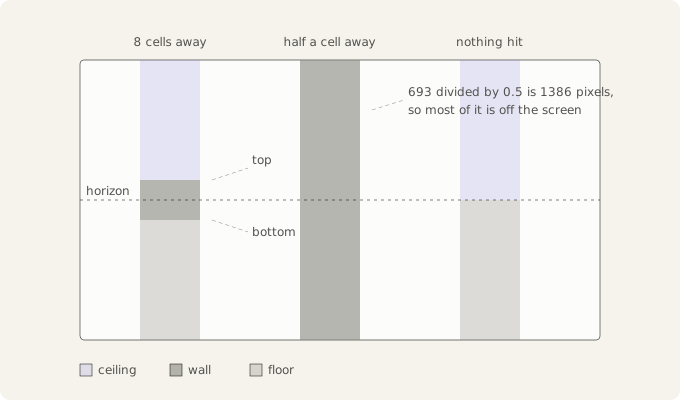
The horizon sits at HEIGHT / 2 and the wall grows out from it equally in both directions, which is the same as saying your eye is exactly halfway up the wall. That assumption is baked in fairly deep, and breaking it is what gets you the ability to look up and down.
wall_bottom comes from wall_top + wall_height rather than being worked out from scratch, for the same reason as the minimap cells: derive both edges from one shared number and they can't disagree by a pixel.
The clamping happens on top and bottom separately, after converting to int. Clamping the height first also works, but only because the wall happens to be centred at the moment. The moment you add looking up and down that version breaks, and you'd be debugging the clamp instead of the thing you just changed.
Draw the world first, then the minimap on top of it. Once DrawWorld covers every pixel of the screen there's no point clearing the screen first.
What you've got, and one thing that's still wrong
At this point you can walk around a maze in 3D. Walls grow as you approach and shrink as you back away, and the small rooms read as rooms from the inside. The minimap in the corner shows which ray produced which column, which is the main reason I keep going on about building it first.
There's one thing still wrong that I should mention.
The walls are slightly curved. A flat wall bulges towards you in the middle. Go back to the fan diagram and look at the row of columns underneath. They form a shallow arch even though the wall in the picture is dead flat.
The reason is visible in the same diagram. The rays at the edges of your view have to travel further to reach the same flat wall than the ray in the middle does, so they report bigger distances, so they draw shorter columns, and the wall curves away at the sides. At 66 degrees the edge rays are about 19 percent longer than the middle one, which is small enough that I didn't notice for ages.
The fix is one multiplication. What you want isn't the ray's own length but the distance to the wall measured along the direction you're facing, so you multiply by the cosine of the angle between that ray and the centre of your view. It belongs in DrawColumn, not in the ray casting.
A better way to cast rays
Look at these two numbers together. Your cells are 1.0 across, and your ray moves 0.02 at a time.
So the ray checks the map fifty times while crossing a single cell, and forty nine of those checks give the same answer as the one before: still in the same cell, still not a wall. The map can only change when the ray enters a new cell, and that only happens when it crosses a grid line.
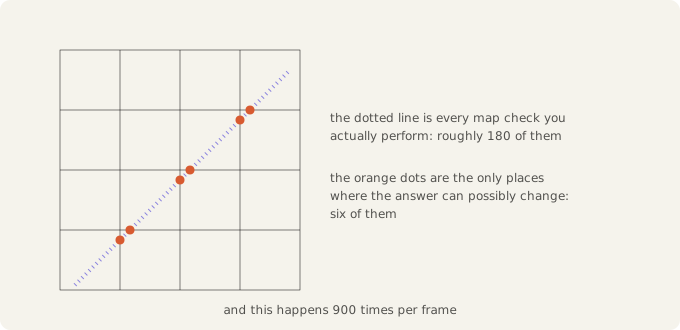
The first thing I tried was making the step bigger. That doesn't work, for two reasons.
The ray overshoots, so it reports the wall as being slightly further away than it really is, and wall edges jitter as you walk. And once the step gets big enough, a ray can pass clean through the corner of a wall without any of its sample points landing inside it, so the wall just isn't there. Set RAY_STEP to 0.5, aim diagonally past a corner, and you can watch a wall disappear.
So you can't buy speed by stepping further, and what you want instead is to stop stepping blindly. There's a standard way to do that, called DDA, short for Digital Differential Analyzer, and it's what the classic raycasters actually use.
What DDA does
Instead of tracking x and y and checking the map at every position, you measure distance along the ray itself, and only look at the map at the points where the ray crosses a grid line.
The reason that works: the ray only ever crosses two kinds of line, vertical grid lines and horizontal ones. And because the grid is even, the gap between two vertical crossings is always the same, and so is the gap between two horizontal crossings.
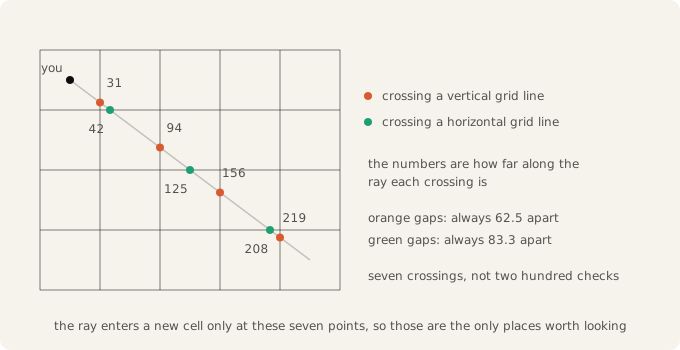
Read only the orange numbers: 31, 94, 156, 219. The gap is 62.5 every time. Then read only the green ones: 42, 125, 208. The gap is 83.3 every time.
So you never have to search for the next vertical crossing. It's exactly 62.5 further along than the last one, which costs one addition to find.
That makes the loop fairly simple. You keep two numbers: how far to the next vertical crossing, and how far to the next horizontal crossing. Each pass you take whichever is smaller, since that's the boundary the ray reaches first. Crossing a vertical line means you move one cell sideways, and crossing a horizontal one means you move one cell up or down. Then you add the relevant gap to that number and go round again.
It's the same shape as merging two sorted lists: two pointers, keep taking the smaller one.
What it gets you
Speed is the obvious one: about ten checks per ray instead of a few hundred, and each check is cheaper too, because there's no cos or sin inside the loop any more. Those get called once per ray at the start, and everything after that is comparisons and additions.
You also get exact distances. The current version rounds every distance to the nearest 0.02, so wall heights snap between values as you walk and the edges shimmer slightly. DDA lands precisely on the wall surface, so movement comes out smooth.
The corner problem goes away as well. DDA only ever changes one cell index per pass, so it can't skip a cell, and the vanishing wall trick doesn't work on it.
And it tells you which side of the wall you hit. Since each pass crosses either a vertical line or a horizontal one, you know which face the ray landed on. Darken one orientation and corners become visible, which is a lot of why Wolfenstein reads as solid geometry rather than flat coloured stripes.
One thing DDA doesn't fix is the curved walls, since that correction lives in DrawColumn. If you swap in DDA expecting the curve to go away too, you'll end up looking for a bug in brand new code when the cause is somewhere else.
I haven't actually done this yet
Everything in this post is the slow version, and that's what I have running.
Part of it is that I wanted to write this up while the confusion was still fresh. The rest is that the naive version runs fine. It's a 24 by 24 map on a modern machine, and nine hundred rays crawling forward in tiny steps is a lot of wasted arithmetic that still keeps up with the screen without trying. Nothing forced me to fix it.
So DDA is still on the todo list. If I get round to it I'll come back and add it here, or write it up separately and link it from this post.
If you want to build it yourself first, the description above is most of the way there. The parts I left out are the arithmetic for the two gap sizes and for the distance to the first crossing of each kind, and both come out of the same triangle as everything else here. One suggestion if you do: count how many times you call MapAt per frame, before and after. On a map this small the frame rate looks fine either way, so it won't tell you much.
Where to go next
The things I want to add, roughly in the order that seems sensible:
- DDA, as above, plus the cosine correction for the curved walls.
- Textures. Once DDA gives you the exact point on the wall face, you can turn that into a horizontal texture coordinate and sample a bitmap down the column instead of filling a solid colour.
- Wall shading. Darken one face orientation using the side information DDA hands you. It's close to free and it's what makes corners readable.
- Floor and ceiling casting. Instead of two flat colours, work out which floor cell each pixel below the horizon belongs to and sample a texture for it. This one runs per pixel rather than per column, so it's the first part where speed actually matters.
- Sprites. Enemies and items are billboards: work out their distance and angle relative to your view, scale them the way walls are scaled, and draw them back to front, testing against the per-column wall distances so they clip properly behind walls.
- Looking up and down, which means giving up the assumption that the horizon sits at
HEIGHT / 2.
Textures and shading are the ones I'd do first, since they change how it looks the most for the least work.